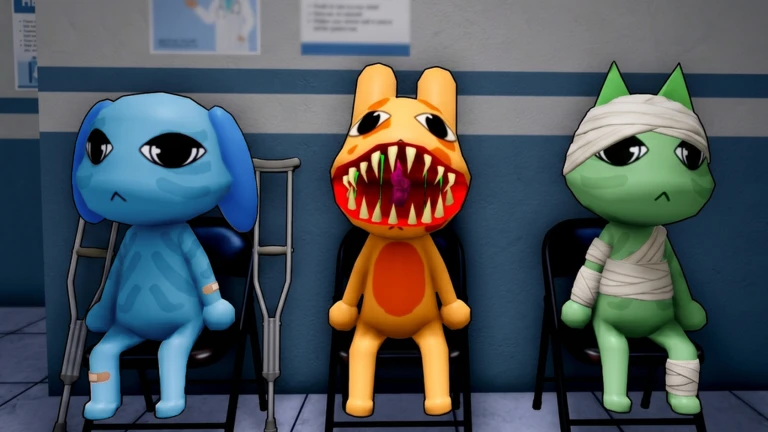
| Wide Eyes and Sharp TeethAppearance |
Creepy distorted smile with sharp teeth and 2 glowing eyes with mismatched proportions. Voice is low-pitched and distorted. Visible at the window without any equipment. |
Do not admit. Compare face and voice against the normal patient baseline before proceeding. |
High |
Wiki reference |
| Three EyesAppearance |
Patient has 3 glowing red eyes instead of 2. Voice is low-pitched and distorted. Visible at the window without any equipment. |
Close shutters immediately. Do not move to treatment. |
High |
Wiki reference |
| Hollow FaceAppearance |
Big hollowed-out eyes with bags under both. Patient is frowning. No normal eye pupils. Visible at the window without equipment. |
Stop all treatment. Close shutters before patient enters. |
Critical |
Wiki reference |
| Unnatural Facial AppearanceAppearance |
Two variants: (1) Big eyes with black pupils and prominent eyebags, paired with a large drawn-on smile. (2) Small but wide eyes with black pupils paired with realistic human teeth. Voice is low-pitched and distorted in both variants. |
Either variant is a rejection signal. Close shutters immediately. |
High |
Wiki reference |
| TwitchingAppearance |
Patient exhibits twitching in both arms, the head, and neck resulting in an elongated neck effect. Sometimes visible at the window without equipment, but other times only detectable through the security camera. |
If twitching is visible at the window, close shutters immediately. If unsure, check the security camera before deciding. |
Medium |
Wiki reference |
| Staring at PlayerAppearance |
Patient stares directly at the player instead of behaving like a normal patient. Exact visual details are still being verified in the current game version. |
Treat persistent unnatural staring as a rejection signal. Compare against normal patient behavior. |
Medium |
Community reported |
| Incorrect PhotoPhoto |
The patient's photo does not match how they appear at the window. Differences can include eyes, ears, or horns - for example, the photo shows bear ears while the patient at the window has rabbit ears. |
Hold admission. Compare the live patient against the photo carefully. Any mismatch in eyes, ears, or horns is a rejection signal. |
Medium |
Wiki reference |
| Unnatural PhotoPhoto |
The patient may appear normal at the window but their photo shows eerie and realistic facial features that do not match the Roblox art style. |
Do not stare at a suspicious photo. Reject the patient if the photo face looks hyper-realistic or disturbing. |
Medium |
Wiki reference |
| Static PhotoPhoto |
The patient's photo has a static and grainy effect, making it appear corrupted or broken. |
Treat the corrupted image itself as the rejection signal. Do not admit the patient. |
Medium |
Wiki reference |
| Cursed PhotoPhoto |
The photo shows wide bloodshot eyes with a grin. WARNING: Picking up this photo and looking at it causes the player to lose 10 Sanity points. Leaving it on the counter does not drain Sanity. |
Do not pick up the photo. Reject the patient immediately using the shutters. Leave the photo on the counter if you have already put it down. |
High |
Wiki reference |
| Black EyesCamera |
On the security camera, the patient's face is obstructed by a black image of eyes that stare at the player. Patient appears normal at the window. |
Check the security camera for every patient after the photo check. Black eyes on camera is a definitive rejection signal. |
High |
Wiki reference |
| Unnatural BodyCamera |
On the security camera, the patient appears heavily stretched and distorted. Closing and reopening the security camera view causes their body shape to change every time you switch back. |
If the body shape changes each time you reopen the camera feed, reject immediately. Do not open the shutters. |
High |
Wiki reference |
| Staring at CameraCamera |
Patient looks directly at the CCTV camera at all times, even while walking toward the desk. Normal patients do not face the camera. |
Constant camera-facing behavior is a strong rejection signal. Verify on the lobby camera for a side-view angle before deciding. |
High |
Wiki reference |
| Void / Black PatientCamera |
On the security camera, the patient appears completely void black including the eyes, with no visible features. Usually appears after the fourth shift. |
A fully black patient on camera is always an anomaly. Close shutters before they reach the desk. |
Critical |
Wiki reference |
| Skin Walker on CameraCamera |
The patient appears as a skinwalker only when viewed through the security camera. Difficult to detect on the check-in camera alone - use the lobby camera for a side view of the patient for a clearer angle. |
Switch to the lobby camera for a side view when unsure. Any skinwalker appearance on camera is a definitive rejection signal. |
Critical |
Wiki reference |
| Different Ears on CameraCamera |
The patient has different ears when viewed through the security camera compared to how they appear at the window. For example, rabbit ears at the window but bear ears on camera. |
Compare ear shape between the window view and the camera view. Any mismatch is a rejection signal. |
Medium |
Wiki reference |