interactive problem solving

Animal Hospital Emergency Solver

Use the Animal Hospital emergency solver for quick treatment and response hints when a shift goes wrong.

animal hospital emergency solver is a interactive problem solving page in this Animal Hospital Roblox guide. The goal is fast, source-aware help for players who need a clear next step.

Pick the problem

Recommended action

Open the anomaly checklist, compare room signs, and avoid treating until you know the trigger.

Always verify against the current game version before making a risky choice.
Official Roblox Images

Real game scenes from the Roblox page

These images come from the public Animal Hospital Roblox experience page and are used as source-labeled reference screenshots. They are not user-taken gameplay captures and do not imply affiliation with Roblox or Animal Anomaly.

Animal Hospital Roblox official screenshot showing seated animal patients and an anomaly face
Official Roblox page image: patient lineup and anomaly visual.
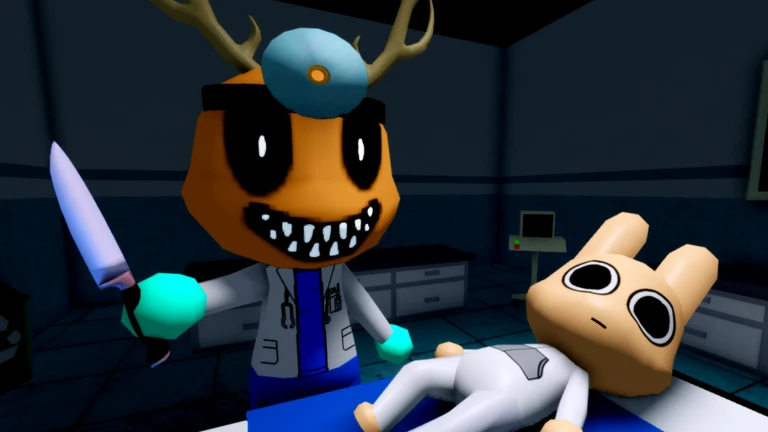
Animal Hospital Roblox official screenshot showing hospital room, doctor character, and patient bed
Official Roblox page image: treatment room scene.

When to use the solver

Use it when you need a fast next step. For detailed tables, jump to the anomaly checklist or treatment guide notes.

Detailed guide notes

What the emergency solver does

The Animal Hospital emergency solver is for the moment when a player cannot pause to read a long guide. Pick the closest problem, then use the recommended action as a first step. It does not replace the anomaly checklist or a full treatment chart; it routes you to the safest next decision when the shift is already under pressure.

The tool is intentionally conservative. If the issue looks like an anomaly, it tells you to verify signs before treating. If the patient is getting worse, it points you back to visible symptoms and room state. If the Barney quest is involved, it pushes you to the spoiler-aware guide instead of guessing a story choice.

When not to trust a quick answer

Do not use the solver as proof that a mechanic is confirmed. Roblox updates can change counters, rewards, and event behavior. Use the solver to stabilize the run, then open the related page for deeper notes. If a result conflicts with what you see in the current game, trust the live game and treat this page as outdated until it is rechecked.

The strongest next improvement is a real treatment chart: problem, visible sign, likely normal action, possible anomaly, item to check, and failure risk. That would make this page match the research recommendation for an Emergency Solver and Treatment Chart tool.

Quick questions

Is the solver always right?

No. It gives a conservative next step based on the selected problem. Use the linked guide page for deeper checks.

Can the solver replace a treatment chart?

Not yet. The next upgrade should add a treatment chart with symptoms, normal responses, anomaly checks, and item notes.

Research coverage notes

The solver page is a tool page, so it should stay concise above the fold and deeper below the tool. The reports favor this format because players need fast decisions during a shift, not a wall of text before the interface. The expanded copy now explains where the tool is useful and where it is limited.

The next improvement should be URL-restorable states and a real treatment chart. For example, a URL parameter could open directly to a patient, anomaly, Barney, or shift result. That would make shared help links more useful for Discord, Reddit, and short video comments.

Verification checklist

This page has one job: answer the interactive problem solving intent without competing with the other guide pages. Before adding new claims, check whether the detail belongs here or should become a separate page with its own search intent.

Use three confidence labels consistently: verified for live game or official-source evidence, community-reported for plausible but not fully reproduced details, and unverified for ideas that still need a playthrough or source check. Do not turn a rumor into a step just because it appears in a video title.

Add a treatment matrix with symptom, likely normal action, possible anomaly, item to check, and confidence. That makes the solver more than a button list while keeping the interface fast.